Personal coding assistant setup
I have been using Claude on my laptop via CLI or the mobile app’s remote control for over a year. Whether for cost savings or curiosity, I wondered: How can we set up the same on a self-hosted stack, usable from both my Mac and my phone?
That single question led to following sections and together they trace how the setup came together.
What model to choose?
After exploring options, I settled on Qwen3.6-27B-AWQ-INT4 (a 4-bit AWQ quantizedquantizationCompressing model weights from higher precision (e.g., FP16) to lower precision (e.g., 4-bit) to reduce VRAM use, with a small quality cost. build). It offers strong benchmarks and, when evaluated with Claude Opus, produced high-quality code with tool support and a reasoning mode.
Selecting the right GPU for the user experience
GPUGPUGraphics Processing Unit — specialized hardware optimized for the parallel matrix math that powers LLM inference and training. size directly impacts token-generation speed, VRAMVRAMVideo RAM — high-bandwidth memory on the GPU. An LLM must fit in VRAM to run efficiently. usage, and bandwidth. I tried OllamaOllamaA lightweight local LLM runner that wraps llama.cpp, optimized for ease of setup over raw throughput. locally, RunPod (Ollama and vLLMvLLMA high-throughput inference server for LLMs that uses PagedAttention and continuous batching to serve many requests fast.), and Vast.ai to determine the optimal size. I needed 80 GB of VRAM to fit the chosen model comfortably; smaller GPUs could work but would limit speed and quality. This configuration gave token speed of >60 tokens per second which is more than good enough for agentic coding as well.
Budget considerations
I started with a $100/month budget as a target. But soon realized that running a GPU 24/7 would exceed this in no time, so I reduced usage to ~5 hours per day, five days a week—bringing costs close to $100 even on an 80 GB GPU. After comparing RunPod and Vast.ai, I chose Vast.ai for its lower rates. Both RunPod and Vast.ai are good with setup.
Setting up the LLM model
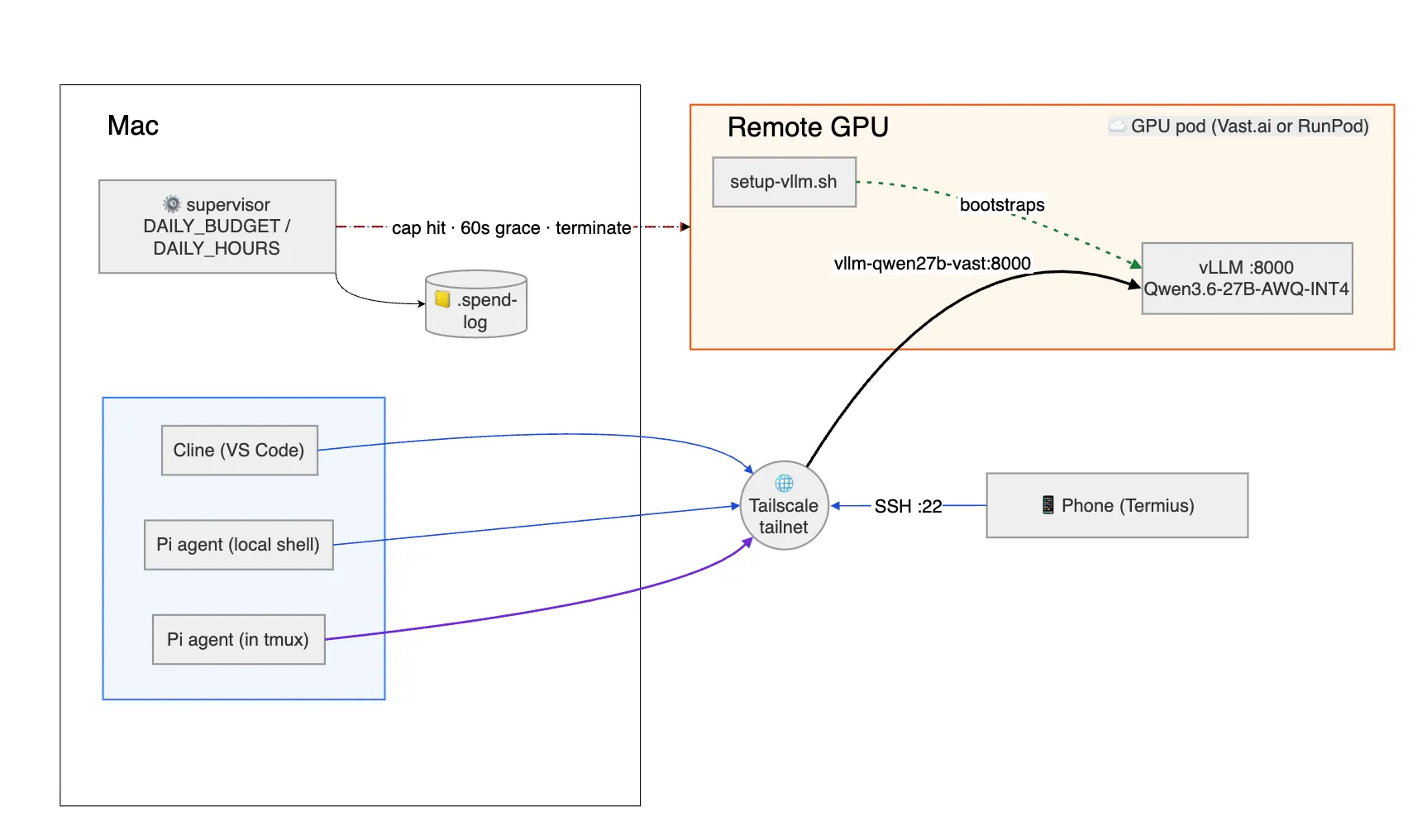
Once the GPU was ready, the next step was maximizing its synergy with the model. An APIAPIApplication Programming Interface — a defined contract that lets one program call another, here used to send prompts to the LLM server. layer was essential, and vLLM proved to be the fastest option compared to Ollama, as I confirmed through local tests.
To simplify connectivity, I configured the GPU with a private DNS using TailscaleTailscaleA zero-config mesh VPN built on WireGuard that gives each device a private, stable address and DNS name.. This creates a friendlier network, assigning each machine a DNS name (magic DNS) — no public IP, no port forwarding, and the same hostnames work from a coffee shop or my phone. That last part matters when the phone joins later.
Connecting clients to the LLM
With the API in place, I needed client software. Claude Code was my go-to for Anthropic models, but I found Pi Coding Agent, which offers a similar experience with extensions. For VS Code, the Cline extension lets users connect via Tailscale and use the LLM as a copilot. Any client capable of hitting the LLM API will work, but the above options are the simplest to set up.
Mobile coding via the Mac
To replicate Claude’s remote control on my phone, here are the steps:
- Installed Termius mobile app
- Installed Tailscale mobile app
- Entered the Mac’s Tailscale DNS
- Connected via Termius.
- Ensured a tmuxtmuxA terminal multiplexer that keeps shell sessions alive across disconnects and lets multiple clients attach to the same session. session on the Mac so both laptop and phone could attach simultaneously.
This setup lets the Mac and mobile share a single tmux session, allowing both to interact with the LLM and produce code together and can have handoff between Mac and phone seamlessly.
Next steps
- Draft detailed, step-by-step instructions for the entire setup.
- Drill down into these topics:
- LLM inference mechanics
- Quantization techniques
- Why vLLM outperforms Ollama
- Tailscale’s inner workings
- and more questions and experiments
Closing thoughts
While this self-hosted solution doesn’t yet match Claude’s performance and quality, it’s a valuable experiment in operating without subscriptions. As API costs rise and open-source models mature, a hybrid approach leveraging both local for coding and paid solutions for review, plan and complex work will likely become the most resilient strategy to get best of both worlds. Though my intent is to use it for coding, I think we can use same setup for any purpose as all layers can be swapped with different or better ones.
References
- Qwen models: https://qwenlm.github.io/
- Qwen3.6-27B-AWQ-INT4: https://huggingface.co/cyankiwi/Qwen3.6-27B-AWQ-INT4
- vLLM: https://docs.vllm.ai/
- Ollama: https://ollama.com/
- RunPod: https://www.runpod.io/
- Vast.ai: https://vast.ai/
- Tailscale (Magic DNS): https://tailscale.com/kb/1081/magicdns
- tmux: https://github.com/tmux/tmux/wiki
- Termius: https://termius.com/
- Claude Code: https://www.anthropic.com/claude-code
- Pi Coding Agent: https://pi.dev
- Cline (VS Code extension): https://cline.bot/